On this page
Type how to reset a garage door opener into a phone and you get six different answers, because there are six resets and each fixes a different fault. Some take a minute at the power point; one, the travel limits, can make a door dangerous if rushed. Here is how we sort them on a Perth driveway, and which to do yourself.
Which garage door reset do you actually need?
- Dead or odd since a power cut, storm or tripped safety switch: a power cycle.
- Remote lost or stolen, or you have just moved in: clear the remote memory, then pair the remotes you still hold.
- New spare remote, nothing else wrong: no reset, just pair it.
- Door lifting off the floor again, stopping short or not opening fully: reset the travel limits, carefully.
- Motor runs but the door stays put since someone pulled the red cord: re-engage the release.
- Keypad PIN forgotten or known to too many people: reset the keypad code.
How do you power cycle a garage door opener properly?
A power cycle restarts the control board and is the nearest thing most openers have to a reset button. It clears a board that locked up in a summer storm or brownout, a wall button gone quiet, a light that stays on. On a modern opener it does not touch remotes or limits, so start here.
- Switch the opener off at the ceiling power point or unplug it. If you cannot reach it safely, turn off the garage circuit at the switchboard.
- Check the RCD, the safety switch, while you are there. If it has tripped, unplug the opener before resetting it. If it trips again with the opener unplugged, the fault is elsewhere on the circuit and you need an electrician.
- Wait about a minute so the board discharges. If the opener has a backup battery, disconnect that too, or the board never restarts.
- Power up and press the wall button once. Some openers make a slow reference run to one end of travel to find their place; let it finish.
- Test a remote. If the wall button works and the remotes do not, the fault is the remotes or the receiver, not the power.
No button marked Reset? That is normal
Most openers sold in Australia have nothing labelled Reset. The learn or code button handles remotes, the limit buttons or screws handle travel, and pulling the plug restarts the electronics. A few models hide a factory reset in a menu; only the manual for your model number will say.
How do you clear the remote memory (a hard reset)?
Wiping the memory, which is what most people mean by a hard reset, removes every remote, keypad and car button the opener has learnt. Do it when a remote is lost or stolen, when you move into a house and cannot be sure how many remotes are out there, or when the memory is full. On most openers you hold the learn or code button on the motor head until its LED goes dark or the unit beeps. Hold times and button names vary by model, so check the motor label and manual first:
- Merlin: one learn button on the motor head, often under a flap or beside the light. Held around six seconds until the LED goes out, it clears every remote; newer units may also offer erase-all in the wall control menu.
- B&D: the coding button on the Controll-A-Door head unit, marked Set or with a remote symbol; held until the indicator changes, it wipes the stored remotes on most models. Follow the leaflet for the time.
- Steel-Line: the code or learn button by the indicator lights on the SD800, SD1200 and roller units; hold it until the LED goes out, for the time the manual gives.
- ATA and Centurion (some carry the Avanti name): erase runs from the code button or, on screen models, from a menu; both publish it by model number.
Everyone loses access at the same moment
Erasing the memory drops every remote, every HomeLink button in every car and usually the keypad in one go. Round them all up first, do it with the door closed, and keep a house key on you if the internal garage door is your usual way in.
How do you pair the remotes again afterwards?
Every transmitter now has to be taught back in, one learn cycle each: a short press on the learn button, never a hold, then the remote button until the motor light blinks or the unit clicks. The button positions, press counts and HomeLink car steps for each brand are in our step-by-step remote programming guide. A remote that still refuses after a fresh battery is usually the wrong frequency or generation, not a failed reset.
How do you reset the travel limits and force?
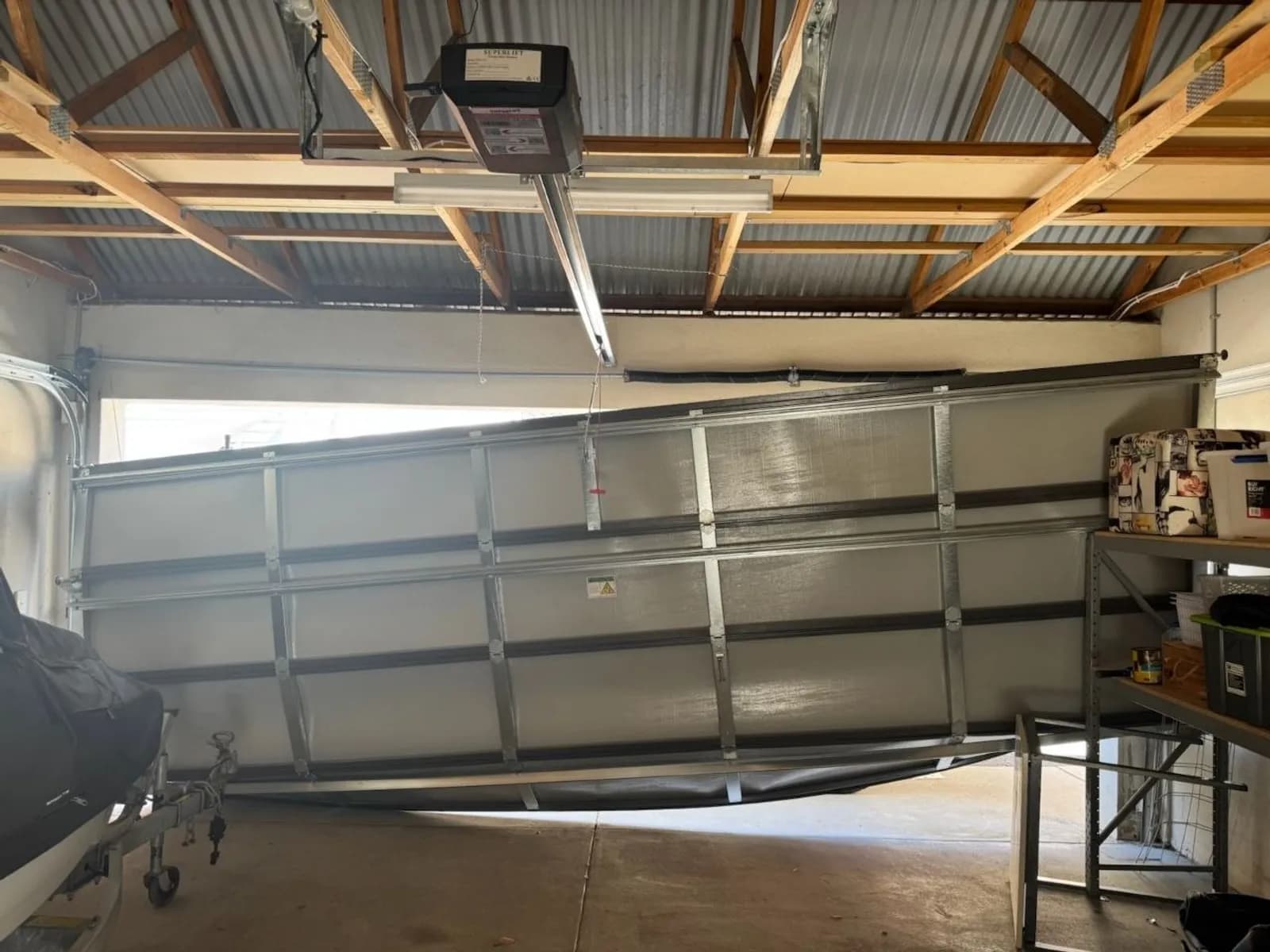
Travel limits tell the opener where the floor is and where fully open is. Force, where adjustable, sets how much resistance the door may meet before the opener treats it as an obstruction and reverses. Reset the limits when the door touches the floor and lifts again, stops short with daylight under it, or stops before fully open. They drift after a new door goes in, after re-engaging in the wrong spot, and as the bottom seal compresses.
The routine is model-specific, so start with the manual for the model on the motor label. In general terms: put the opener into limit-setting mode from the buttons on the head unit or wall control, drive the door down until the seal just meets the floor and confirm, drive it to fully open and confirm. Older openers use screws or dials on the side of the head marked open and close, turned a quarter turn at a time. Many current units then learn the force on the next full cycle; run the door open and closed twice from the wall button and stand clear.
Read this before touching the force setting
Force is the door's last protection against crushing a child, a pet or a car boot. Never raise it to push a door through a sticking point; a door that suddenly needs more force has a spring, cable, roller or track problem. Pull the release and lift the door by hand: if it is heavy or will not stay put at waist height, the springs are the fault and that is our job, not a setting. After any limit or force change, lay a length of timber flat under the door and close it from the wall button; it must reverse the moment it touches. If it does not, if the force has already been turned up, or if the opener is an old unit with screws you cannot identify, stop and call us.
How do you reset the opener after pulling the red cord?
The red cord does not reset anything. It only unhooks the door from the opener; the reset is hooking it back up. On a sectional door, close the door by hand, then either pull the cord back towards the motor until the trolley latch clicks, or press the wall button and let the trolley run along the rail until it picks up the carriage. Roller door openers have a lever, knob or key release on the motor beside the drum; move it back to the drive position. Then run one full open and close from the wall button: if the door stops short or the opener strains at the top, the limits need resetting. For the release itself, and for a door stuck open, follow our guide to opening a garage door by hand.
How do you reset a garage door keypad code?
A wireless keypad is one more transmitter, so there are two resets. If you know the current PIN, most pads let you change it from the pad by following the leaflet, usually the old PIN, a hold on one key, then the new PIN twice. If the PIN is forgotten, or too many people know it after a tenancy or a sale, remove the keypad from the opener instead: on most openers that is the erase-all step above, then pair it again with a fresh PIN. Swap the battery while the cover is off; a fading battery is often the real reason a keypad has gone quiet.
What won't a garage door reset fix?
A reset changes what the opener remembers. It cannot mend anything mechanical or electrical, and repeating resets on a physical fault sometimes finishes off a gear. Four faults get mistaken for reset problems more than any others.
- A broken spring. A loud bang from the garage, a visible gap in the torsion spring above the door, a door that is very heavy by hand, or an opener that lifts it a few centimetres and stops. The spring carries the weight, not the opener.
- A stripped drive gear. The motor hums or runs, the chain or belt does not move, and fine white dust sits on the head unit. Common on original chain-drive openers in the 1990s and 2000s estates of Joondalup, Canning Vale and Ellenbrook.
- A dead logic board. No lights and no response to the wall button after a power cycle and a checked RCD, a door that runs by itself, or a burnt smell from the head unit. Summer storms and surges are a common cause.
- Blocked or misaligned safety sensors. The door opens but will not close from the remote, the opener light flashes, and it closes if you hold the wall button down. Look for a knocked bracket, a cobweb, sand on a lens or low afternoon sun straight into one sensor; our sensor alignment guide covers the fix.
If the wall button does nothing after a power cycle, start with the checks for a motor that will not respond. If the door runs from the wall button but ignores every remote after re-pairing, the checks that separate a dead remote from a dead receiver will point you to the culprit. Beyond that, we repair and replace garage door openers across Perth, same day where we can, no call-out fee, and you hear the price before work starts. We supply, install and service Merlin, Jaytech, Superlift and Steel-Line openers, repair the other common brands, and carry the common parts on the vans, so most faults a reset cannot clear are fixed in one visit.